FAQs
Answers to Common Questions About Pivot™

Answers to Common Questions About Pivot™
Pivot™ Insulin Delivery System is intended for the treatment of diabetes mellitus in persons requiring insulin. Your Pivot™ System consists of an Inserter, Pump, Cartridge, Patch, and the Pivot™ Diabetes App. The Pivot™ Diabetes App operates on your smartphone device and connects to the Pump via Bluetooth® connection to support basal rate programming and viewing activity information. The Pivot™ System can be filled with up to 3.0mL (300 units) of Humalog® U-100 rapid acting insulin and can be worn continuously for three days. Your Healthcare Provider will help you to manage your insulin dosing regimen and prescribe insulin. The Pivot™ System can be used by persons with diabetes to manage insulin therapy independently. The Pivot™ System is capable of delivering insulin at set and variable rates via a selectable basal rate between 0.5 – 4 units per hour (in 0.1-unit increments) and user-selected bolus doses of between 2 and 20 units (in 2-unit increments).
Pivot™ Insulin Delivery System is indicated for the subcutaneous delivery of insulin at set and variable rates, for the management of diabetes mellitus in persons requiring insulin, for individuals 18 years of age and greater.
The Pivot™ Insulin Delivery System is compatible with Humalog® U-100 rapid acting insulin or its generic equivalent Lispro U-100.
Your Pivot Insulin Delivery System aims to simplify diabetes management. The Pivot System offers a user-selected Basal Rate Schedule for all-day insulin therapy, on demand Bolus dosing for correcting glucose levels, and Basal Suspend to temporarily stop insulin flow.
Your basal rate schedule and bolus increment are programmed via the Pivot™ Diabetes app using rates determined by you and your Healthcare Provider.
Your Pump has a single button to initiate priming, control insulin delivery, and check your Pivot System status. Your Pivot System uses lights and tones to make you aware of the Pivot System status, delivery mode, and Alarms.
You can check your Pivot System status during use with a quick press of the Control Button.
The Insulin Pump STARTER KIT contains: Pump (90-day use life), Inserter (2-year use life), Quick Start Guide, User Guide, Patient Medical Device card, 10 Cartridges and 10 patches in sealed trays, and 10 needles and syringes.
The supply kit contains the disposable components and accessories with a 3-day use life, this includes 5 cartridges, 5 Patches, and 5 syringes & needles.
The Pump has a single button to initiate priming, control insulin delivery, and check the Pivot™ System status. The Pivot™ System uses lights and tones to make users aware of the Pivot™ System status, delivery mode, and Alarms. The user can check the Pivot™ System status during use with a quick press of the Control Button.
The operating temperature for the pump is 41.0°F to 98.6°F (5°C to 37 °C). The Pump temperature equilibrates from 60.8°F to 98.6°F (16°C - 37°C) when worn on the body.
If the system is being used outside of the temperature limits the system will deliver an Low or High Temperature Alarm. Note: Low Temperature is a resumable alarm and insulin delivery can resume after.
The System should not be used outside of the altitude limits of -1,300ft to 10,000ft. (1060 hPa - 700 hPa). If the system is being used outside of the altitude limits, the system will deliver an Extreme Altitude Alarm.
If you need to stop using your Pump for an extended period, follow these storage guidelines to help ensure the system remains safe and functional.
Pump and Inserter Storage Conditions
Store the Pump and Inserter in a clean, dry location under the following environmental conditions:
Temperature: -4°F to 140°F (-20°C to 60°C)
Humidity: 15% to 90% RH, non-condensing
Cartridge and Patch Storage
Store the Cartridge and Patch in a dry location, away from direct sunlight.
Follow the storage instructions provided on the Cartridge and Patch labeling.
Important
Improper storage of the Pump, Cartridge, Patch, or Inserter may affect insulin delivery and could result in:
Moderate hypoglycemia
Moderate hyperglycemia
Diabetic Ketoacidosis (DKA)
Delays in insulin therapy
Always store each component according to its specified storage requirements.
The Pivot System can be filled with up to 3.0mL (300 units) of insulin.
NOTE: Do not fill past the Cartridge maximum capacity of 3.0mL (300 units) or below the minimum of 0.3 mL (30 units).
Pack your Pivot System supplies in your carry-on luggage. Do not pack your supplies in checked baggage, as they could get delayed or lost. Always carry an Emergency Kit while traveling. Check with your physician for information on the contents of your Emergency kit.
Do not expose your Pivot System to X-ray screening used for carry-on and checked luggage. Newer full-body scanners used in airport security screening are also a form of X-ray screening and your Pivot System should not be exposed to them. Notify the Transportation Security Administration (TSA) Agent that your Pivot System cannot be exposed to X-ray machines and request an alternate means of screening.
Visit TSA’s website at www.tsa.gov if you have any questions or concerns.
You can contact TSA at TSA-ContactCenter@tsa.dhs.gov or call 1-866-289-9673.
Your Cartridge and Patch must be replaced at the end of the three-day use period, when you receive a Cartridge Alarm, or if you detect an issue. You can detach your Pivot System using the following steps listed in the Quick Start Guide.
To replace your Patch and Cartridge:
• Remove the Pump from the Cartridge and Patch.
• Carefully remove the Patch from your body.
• To remove the Cartridge from your Pump, locate the small release latch that’s next to the lock icon on the underside of the Cartridge and slide it in the direction of the arrow to release.
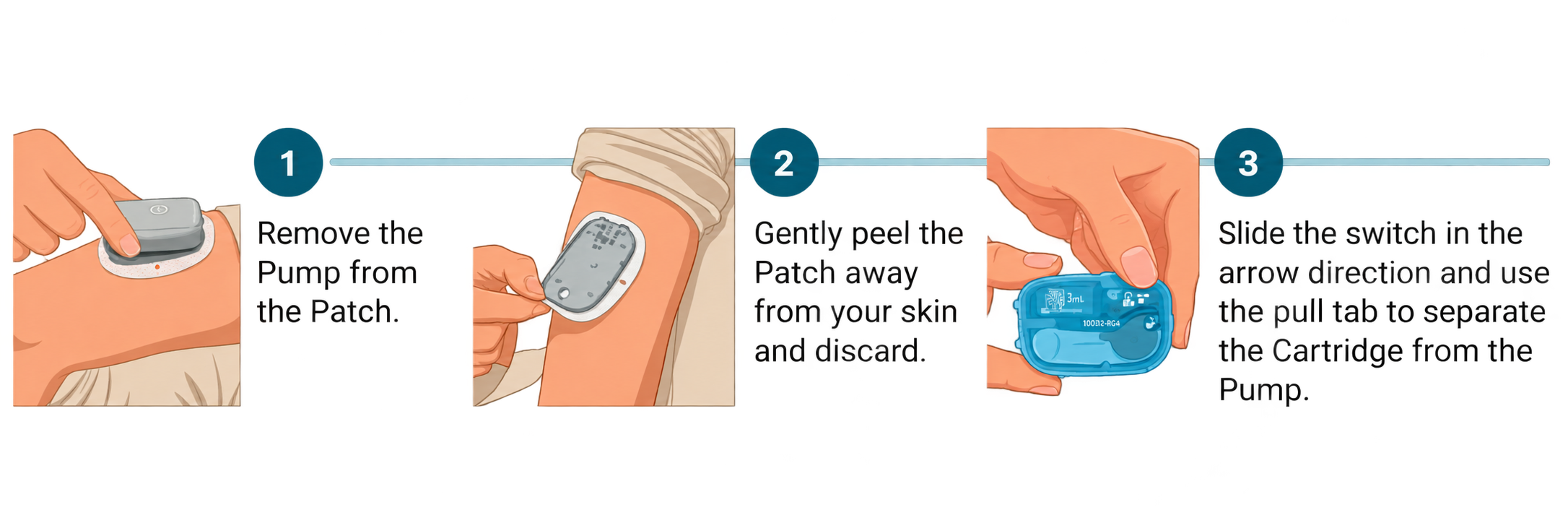
CAUTION: Always dispose of the Cartridge and Patch safely and by your local disposal guidelines. The battery in the Cartridge poses the risk of injury due to fire if not disposed of properly.
The Pivot System is contraindicated for use by patients who do NOT have adequatehearing and/or vision to allow recognition of all functions of the Pivot System includingStatus and Alarms.
CAUTIONS: Modular Medical contraindicates using the Pivot System if you haveinadequate hearing due to the importance of the audible signals provided by the Pump.Ensure that you are able to detect audio and visual notifications. Being unable to hearan Alarm may prevent you from responding to a Pivot System event that requires yourimmediate attention and may lead to moderate hyperglycemia or Diabetic Ketoacidosis(DKA). If you are in a high-noise environment, keep an eye on your Pump, as the lightsignals will notify you of any issues.
The Pivot System is incompatible with certain common products that are used on the skin. These include bug sprays with or without DEET, perfumes, deodorant sprays, body lotions and sunscreens. Use of these products on the Pivot System itself or where the System is adhered to the skin can cause cracks in the plastic used to manufacture the Pivot components.
DO NOT allow these products to come in contact with the Pump, Cartridge or Inserter. ALWAYS remove your Pump before applying these products and ALWAYS wash your hands before handling your Pump, Cartridge or Inserter after using such products.
ALWAYS change your Cartridge if it becomes exposed to such products and immediately clean your Pump. Failure to do so may result in damage to the Pump, Insulin Cartridge or Inserter and in some cases lead to moderate hyperglycemia, moderate hypoglycemia, or Diabetic Ketoacidosis (DKA).
DO NOT expose your Pump to within 6 inches of common products with magnets, including cell phone cases or wireless charging cases. Exposure to magnets or products with magnets may interfere with the Pump motor. Damage to the motor can lead to moderate or severe hypoglycemia, moderate hyperglycemia, or Diabetic Ketoacidosis (DKA).
The Pivot™ Diabetes App operates on your smartphone device and connects to the Pump via Bluetooth® connection to support programming your treatment settings and to view your Pivot System activity.
The Pivot™ Diabetes app is mandatory for programming a new Pump and for modifying the basal rate schedule on a Pump in use and must be used to determine and manage appropriate responses to all alarms.
The Pivot™ Diabetes App is available for download in the App Store. Download the Pivot™ Diabetes App and follow the instructions to install the application.
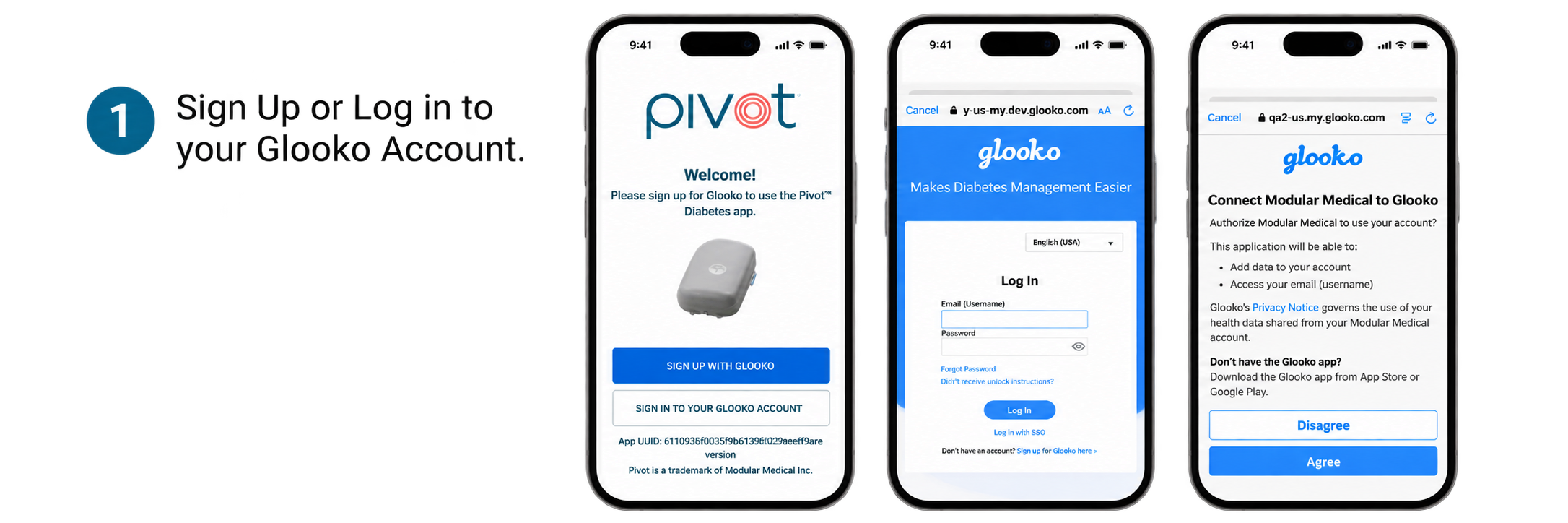
You will also need to sign up for a Glooko account if you do not already have one.
The Pivot™ Diabetes App is only available in English
Yes, Glooko works seamlessly with the Pivot Insulin Delivery System to synchronize your data. Instructions for signing up and logging into the Glooko Account are found in the Pivot User Guide.
Glooko is a comprehensive diabetes management platform that helps people with diabetes understand and control their blood glucose levels and well-being. Track your blood glucose, insulin, weight, exercise, food, and more, all in one place. Glooko helps you stay connected with your Care Team(s) between visits, identify trends, share reports with friends/family, and keep your diabetes data in one place.
My Glooko displays your Glooko account information. Deleting your Glooko account will permanently remove your stored activity data and you will no longer be able to use the Pivot™ Diabetes app.
You can temporarily detach your Pump from the Adhesive Pad and the Infusion Set during the three-day use period. Common reasons for detaching your Pivot™ System include the following:
Preparing for medical procedures such as MRIs, CT scans, X-rays, and/surgeries.
Participating in common daily activities, like swimming, bathing/showering, or contact sports.
Yes. The Pivot system is MR (Magnetic Resonance) unsafe. The device presents a projectile hazard.
WARNING: The Pivot System cannot be used inside or in proximity to an MRI machine.
It is important to remove your Pivot System before using a sauna or jacuzzi, or while swimming, bathing, showering, or during contact sports. Your Pivot System is only protected against minor splashing (i.e., IP24 rating). Use of the Pivot System in these scenarios could lead to moderate hyperglycemia or Diabetic Ketoacidosis (DKA).
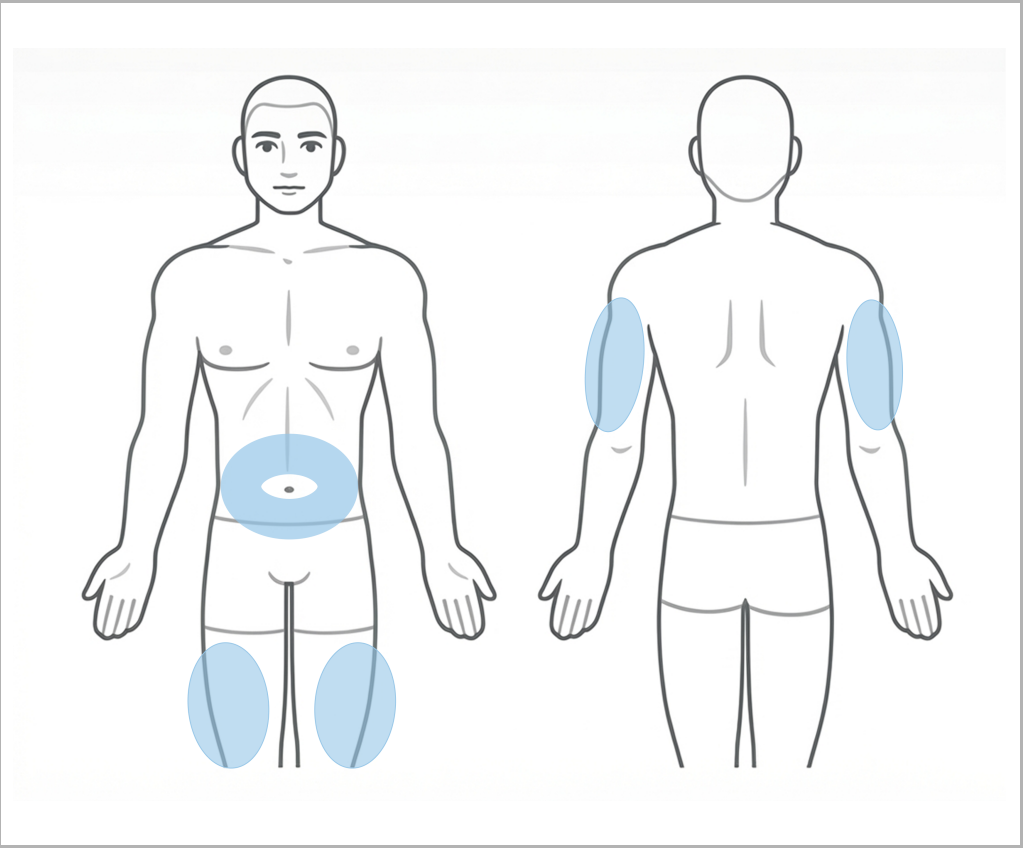
Choosing where you place your infusion site is important. The infusion site should be at least two inches away from your navel or previous infusion site and must be four inches away from a Continuous Glucose Monitor (CGM) sensor site.
The Patch must be launched into:
Fatty tissue on the abdomen
The upper thigh area
The back of the arm
CAUTIONS: Avoid areas with scarring, tattoos, moles, lipodystrophy, and areas that may get bumped or constricted such as the beltline or waistline. Placing your Pivot System incorrectly could lead to moderate hyperglycemia, or Diabetic Ketoacidosis (DKA). Always use a new infusion site that is at least 2 inches away from the previous infusion site. Using the same infusion site repeatedly may lead to infusion site infection, lipodystrophies, moderate hyperglycemia, or Diabetic Ketoacidosis (DKA). Contact your Healthcare Provider if you have symptoms of an infection at your infusion site.
1. Before setting up, wash your hands.
2. Choose the appropriate site location to attach your system.
3. Remove excess hair as required.
4. Clean the site with a 70% isopropyl alcohol wipe.
5. Allow the site to dry.
CAUTION: Do not place the device on broken skin. Before use, ensure your infusion site is clean. Failure to clean the site appropriately may lead to an infusion site infection or a delay in insulin therapy.
Using your fingers, create a wide pinch around your selected site and gently squeeze your skin for at least 5 seconds. When you are ready to insert the Patch, let go of the pinch and place the Inserter against your skin. Press the Launch Button firmly until a "click" is heard. Remove the Inserter from your skin.
WARNING: Every time you change your Cartridge, you must use a different infusion site and replace the Patch. Not doing so can lead to infection, moderate or severe hyperglycemia, or
Diabetic Ketoacidosis (DKA).
Your Pivot System does not require cleaning or maintenance.
If you would like to clean the outside of your Pump, ensure the Cartridge is fully attached and use a moistened cloth with water and a mild detergent to clean, then gently dry. Never submerge your Pump in any liquid or expose it to heat in an attempt to dry your Pump.
If you would like to clean the outside of your Inserter, use a moistened cloth with water and mild detergent to clean, then gently dry. Never submerge your Inserter in any liquid or expose it to heat in an attempt to dry your Inserter.
CAUTION: Only clean the Pump with water and a mild soap. Do not use alcohol, cleaners, solvents, or abrasive products to clean the Pump as this could lead to a toxic episode or cause cracks or discoloration to the Pump housing.
If this is your first time setting up your Pivot System, you must program your Basal Rate Schedule using the Pivot™ Diabetes App.
Set your Basal Rate Schedule in the Pivot Diabetes App by choosing the SINGLE RATE OPTION or a TWO-RATE OPTION.
The SINGLE RATE option will deliver insulin 24 hours per day at your chosen basal rate.
The TWO-RATE option will require two basal insulin delivery rates. You will choose the start time for both Day and Night. The time can be adjusted in 15-minute increments.
The Day rate will end when the Night rate is set to begin. For example, if you set your Nighttime rate to begin at 8:00 PM, your Daytime rate will automatically end at 8:00 PM, and the Nighttime rate will then begin.
Select “Confirm Treatment Settings” and provide user authentication such as Face ID or passcode.
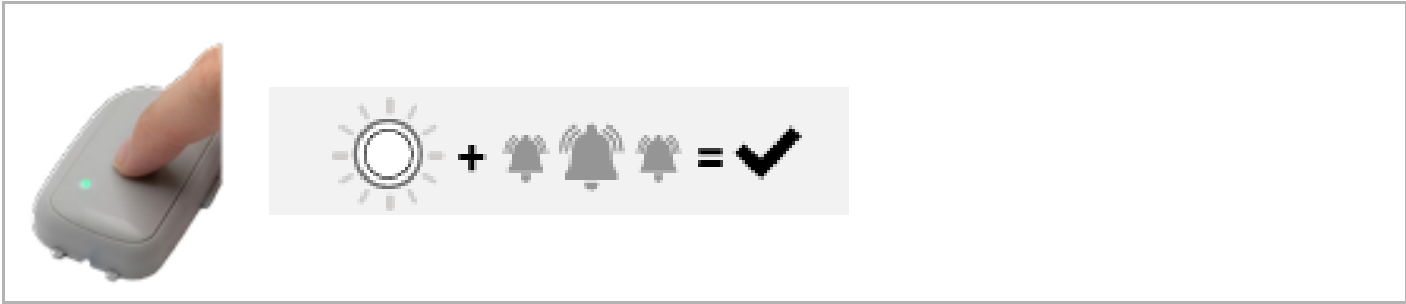
(*) A flashing green light on your Pump indicates the request was received.
(*) Quickly press and release the Control Button to confirm your Basal Schedule.
(*) A flashing white light and three tones indicates that your schedule is set.
WARNING: It is not possible to change the configuration of the Pivot System while it is dispensing insulin. All changes to your Basal Rate Schedule must be done while your Pivot System is in Basal Suspend mode or is starting up after changing the Cartridge. This prevents the risk of accidental Basal Rate Schedule changes that could lead to moderate or severe hypoglycemia, moderate or severe hyperglycemia, or Diabetic Ketoacidosis (DKA).
Set your bolus increment level in 0.5, 1.0, 2.0, 3.0, and 4.0 unit increments. Each press of the Control Button on the Pump while setting up a bolus will deliver this amount of insulin.
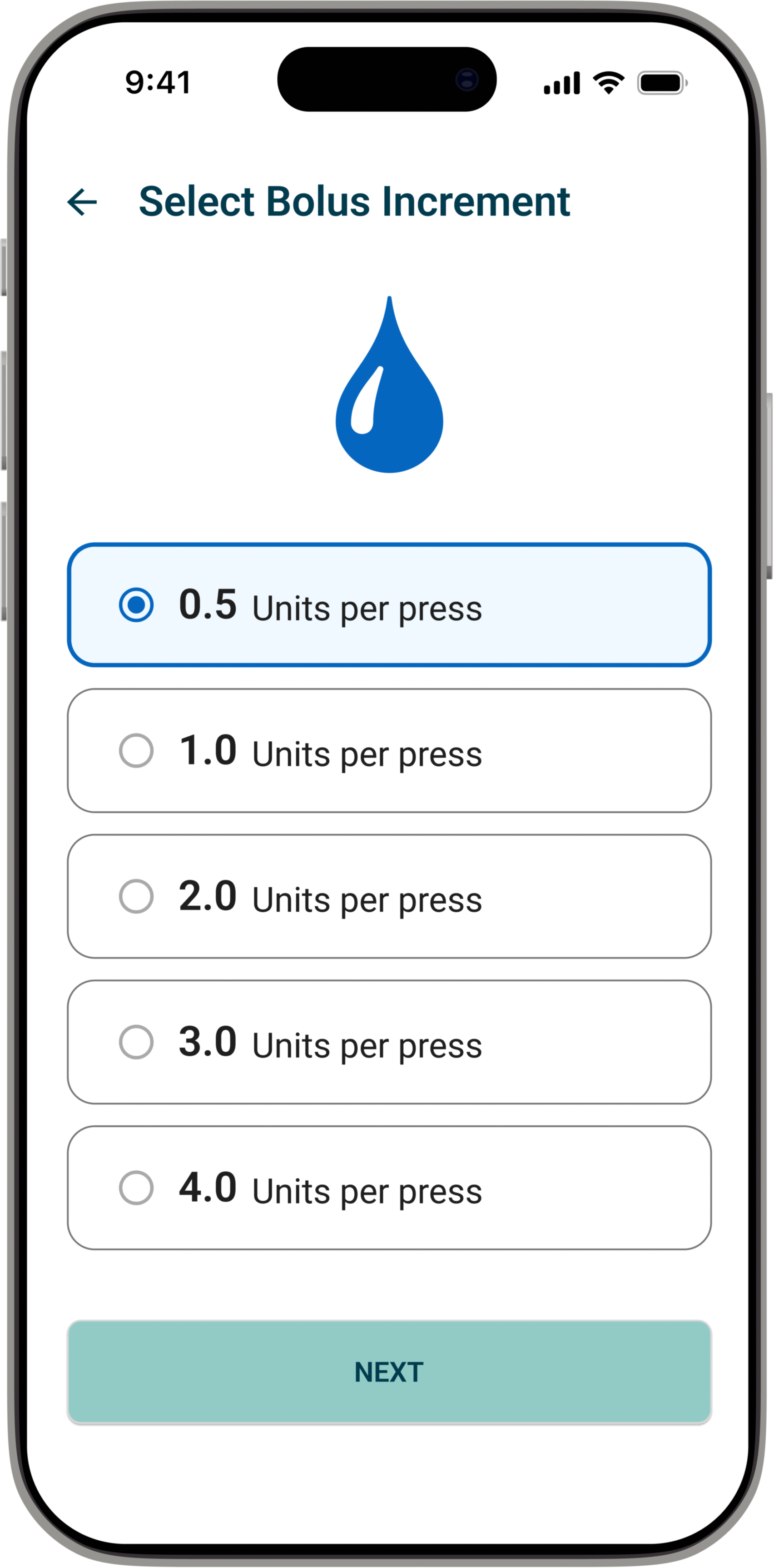
Select “Next”. Then select "Confirm Treatment Settings" and provide user authentication such as Face ID or passcode. A flashing green light on your Pump indicates the request was received. Quickly press and release the Control Button to confirm your Treatment Settings. A flashing white light and three tones means that your schedule is set.
Basal Delivery Mode is the default mode of your System and delivers a continuous flow of basal insulin.
This mode automatically begins when your System has completed setup and priming.
Basal Delivery can be set at a rate of your choosing, between 0.5 - 4.0 units per hour, in 0.1 unit per hour increments. A single basal rate or two basal rates can be programmed in a 24-hour period.
While using your Pivot System, you can check the Pivot System status anytime with a quick press of the Control Button. A solid GREEN light and 3 consistent tones indicate Basal Delivery is active.
You will also see Basal Delivery status at the top of your Pivot™ Diabetes appDashboard. To view your current settings, scroll down to the Treatment Settings section.
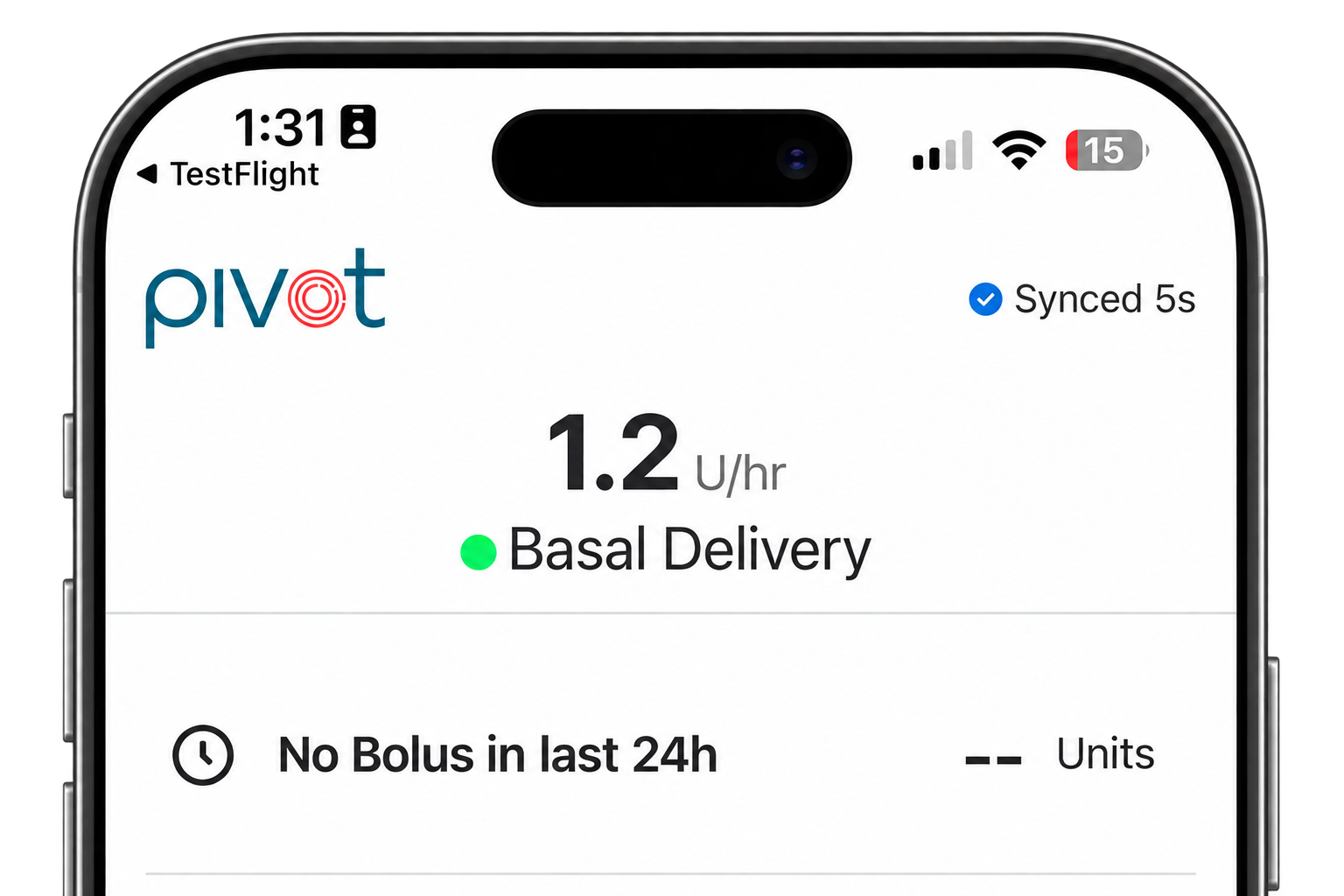
Bolus Delivery Mode is used to deliver a specific quantity of bolus insulin during mealtimes or to correct high blood glucose levels.
Decide the number of insulin units you would like to deliver. Each press of the Control Button on the Pump equals the number of units you programmed in the app as the bolus increment.
Know your dose and find your presses in the table. Max dose is 20 units or 10 presses. Use the table to find the number of presses for your increment. Hold the control button until you see a blue light and hear a beep, then release. Once the blue light appears, quick press the button until you reach your dose. Each press adds one increment and gives one blue flash and beep to help you count.
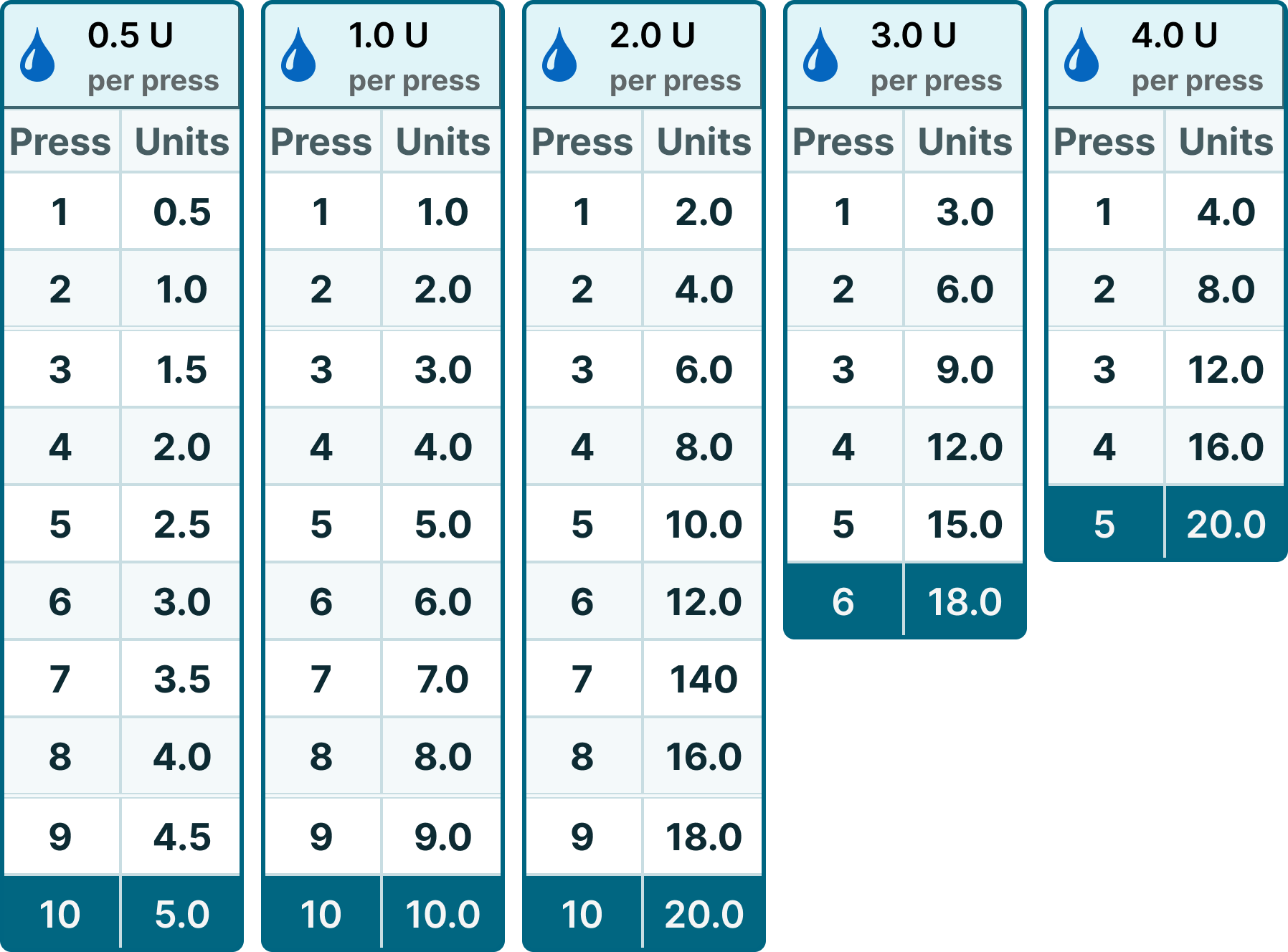
All values in units (U). The table ends at maximum presses or units for that increment.
Example:
(*) 1 press = 2 units
(*) 5 presses = 10 units
(*) 10 presses = 20 units (Maximum bolus is 20 units)
While using your Pivot System, you can check the Pivot System status anytime with a quick press of the Control Button.
A BLUE light on the Pump and 3 ascending tones indicates that you are currently in Bolus Delivery Mode.
You can verify bolus delivery on your Pivot™ Diabetes app in the status bar that says “Bolus Delivery Active” on your dashboard. You will also see “Bolus Delivery Started” when you scroll down to the Pump Activity section.
Check that you are currently in Bolus Delivery Mode by making a quick press on the Control Button. Look for a blue light on the Pump and listen for three ascending tones to indicate that you are currently in Bolus Delivery Mode.
Press and hold the Control Button until you see a green light and hear a single tone, then immediately release the button.
A solid green light and three tones indicate that the System has returned to Basal Delivery Mode.
Basal Suspend Mode is an additional mode available to temporarily pause the delivery of basal insulin.
You may pause your Basal insulin delivery for up to 2 hours. You can do so by entering Basal Suspend Mode.
Press and hold the Control Button until you see a WHITE light and hear a single tone , then immediately release the button.
You will observe a blue light and tone before it turns to white.
When you see a solid white light and hear three descending tones, that means your Pivot System has suspended insulin delivery.
Insulin delivery will automatically resume after the 2 hour suspend has ended.
CAUTION: Delivery remains suspended for 2 hours.
NOTE: Basal delivery may not be suspended while the Pump is in Bolus Delivery Mode. The user must first CANCEL the bolus, then they may suspend basal delivery.
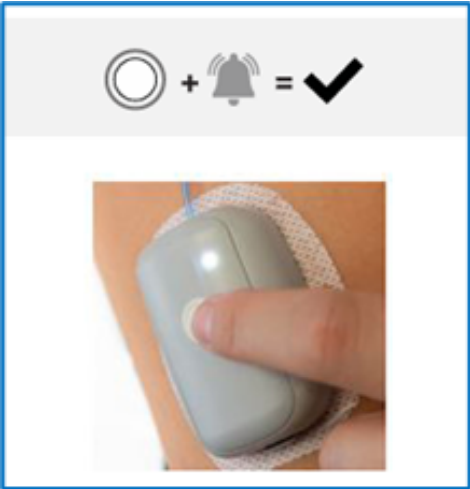
To verify suspend, open the Pivot™ Diabetes App Dashboard and check for “InsulinDelivery Suspended” at the top and the recent Pump Activity log.
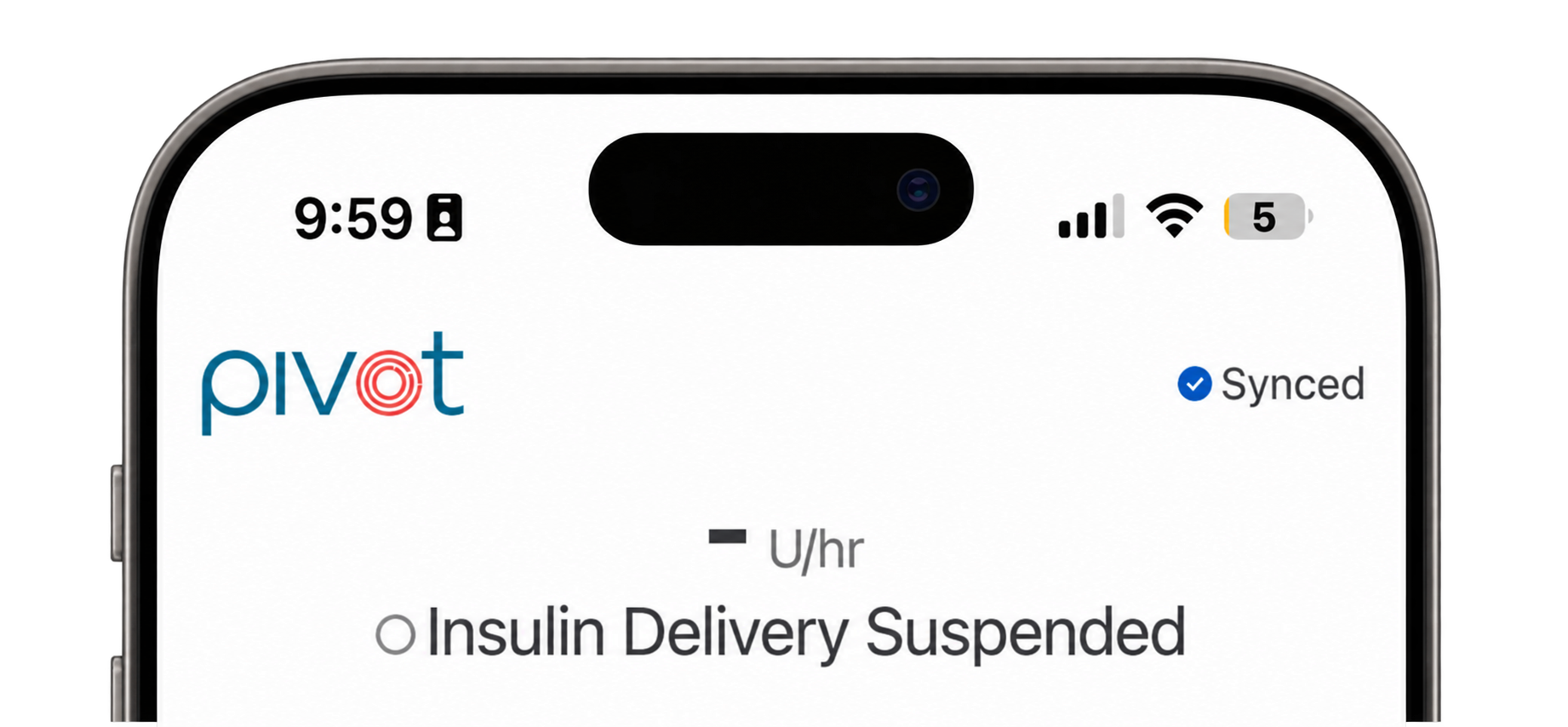
You can resume insulin delivery at any time by repeating the long press, or delivery willautomatically resume after 2 hours.
Press and hold the Control Button until you see a white light and hear a single tone, thenimmediately release the button.
When you see a solid green light and hear three consistent tones, that means your PivotSystem has resumed Basal Delivery.
While using your Pivot System, you can check the Pivot System status anytime with aquick press of the Control Button.
This check will show you the current Delivery Mode and also provide confirmation thatthe LED lights and sound signal tones are working correctly.

Before using your Pivot System, ensure that you have been appropriately trained on its use by a certified Pivot System trainer.
Operating the Pivot System in the absence of training can lead to moderate or severe hypoglycemia, moderate hyperglycemia, or Diabetic Ketoacidosis (DKA).
When receiving your Pivot System there was a Training QR Code located inside the Pivot Supply Kit.
Refer to the QR Code to take you to the training website and schedule your training or you may contact Modular Medical Customer Care at 866-710-1200 or email them at Customercare@modular-medical.com
A Cartridge Alarm means an issue has been detected with your Cartridge. Check your Pivot™ Diabetes app for more information about the type of Alarm you have received and the recommended next steps.
If you receive an Alarm, this means that your Pivot System has stopped delivering insulin.
Possible Causes for Cartridge Alarm

A Resumable Alarm occurs when the Pump detects it is outside of operating conditions.
If you receive an Alarm, this means that your Pivot System has stopped delivering insulin. Check your Pivot™ Diabetes app for more information about the type of Alarm you have received and the recommended next steps.
Possible Causes for a Resumable Cartridge Alarm

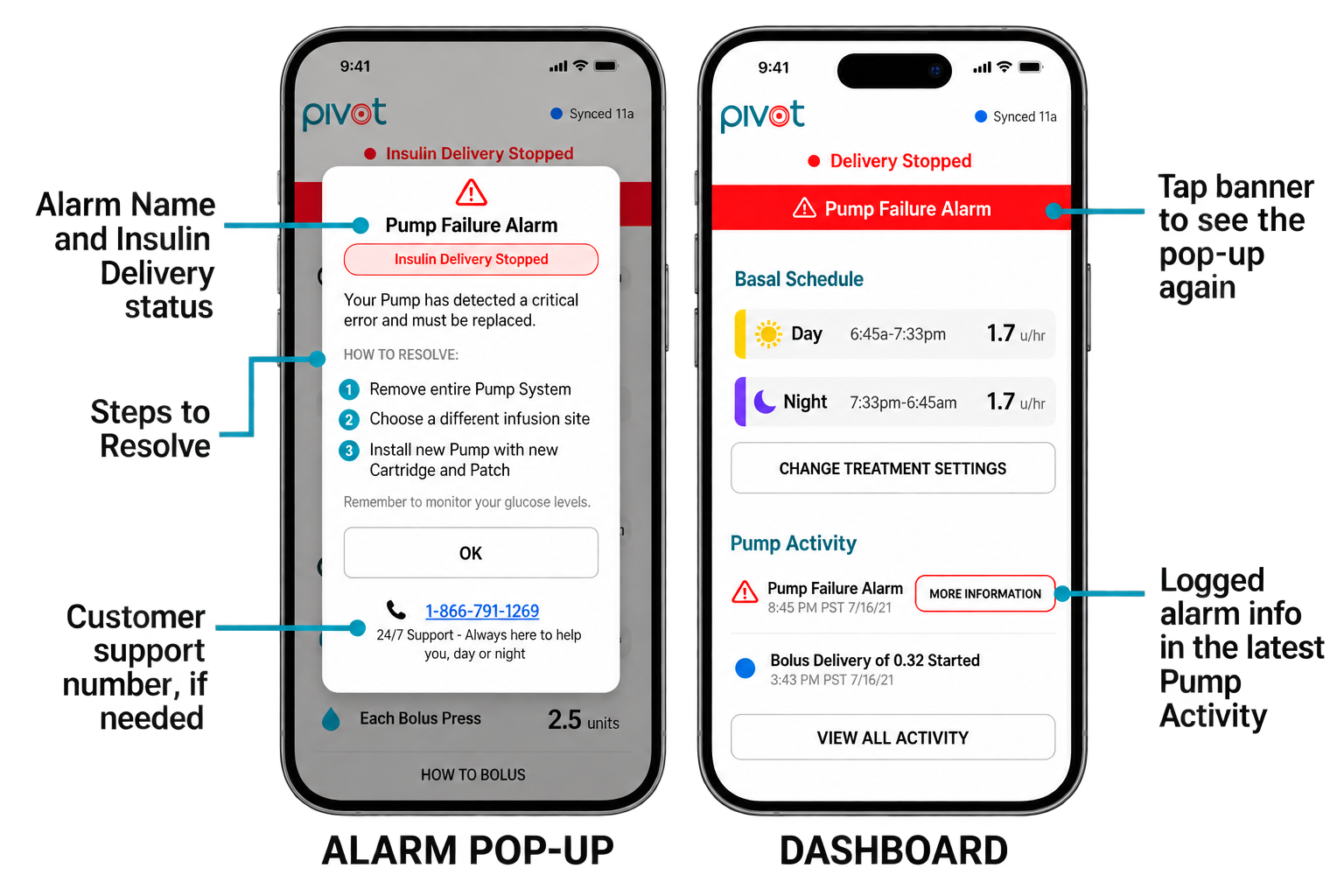
A Pump Alarm means an issue has been detected with your Pump. Check your Pivot™ Diabetes app for more information about the type of Alarm you have received and the recommended next steps.
If you receive an Alarm, this means that your Pivot System has stopped delivering insulin.
Possible Causes for Pump Alarm
Pump Failure Alarm
A critical error, malfunction, or failure of your Pump has been detected.
Pump Expired Alarm
Your Pump has reached the end of its 90-day use life.

Your Pivot System will notify you of problems using Alarms with a flashing red light and tone.
If you receive an Alarm, this means that your Pivot System has stopped delivering insulin. Check your Pivot™ Diabetes app immediately for more information about the type of Alarm you have received and the recommended next steps.
You may mute the audio feedback tone of an Alarm for 30 minutes by quickly pressing the Control Button.
If you receive an Alarm during a bolus delivery, you will not receive the full quantity. This may lead to moderate hyperglycemia.
Alarms must be addressed promptly. Failure to respond to alarms may result in premature battery drain, which can stop insulin delivery and increase the risk of moderate hyperglycemia or Diabetic Ketoacidosis (DKA).
When fitted with an Insulin Cartridge, newly manufactured Pumps are water-resistant (Ingress Protection IP24).
Your Pivot System is only protected against minor splashing. Do not submerge your Pump or allow water to get inside the Pump. Always inspect your Pump for damage. If there are signs of fluid entry, discontinue the use of the Pump.
CAUTIONS: It is important to remove your Pivot System before using a sauna or jacuzzi, or while swimming, bathing, showering, or during contact sports. Your Pivot System is only protected against minor splashing (i.e., IP24 rating). Use of the Pivot System in these scenarios could lead to moderate hyperglycemia or Diabetic Ketoacidosis (DKA).
If air bubbles are present, angle the Cartridge as shown below to move the air bubble to the Fill Port. Reinsert the needle into the Fill Port & draw back the plunger to remove the air bubble.
CAUTION: Do not pierce the Fill Port more than 4 times as this could cause insulin to leak and could lead to moderate hyper glycemia, Diabetic Ketoacidosis (DKA), or a delay in insulin therapy.
When the Pump and Cartridge are connected successfully, you will see a white light and hear a single tone.
A flashing blue and green light indicates the Pump needs to be programmed with the Pivot™ Diabetes app.
To obtain additional supplies, you should speak with your provider, physician or call Modular Medical Customer Care @ 866-710-1200 / CustomerCare@Modular-Medical.com
The patient medical device card is shipped in your Pivot Supply Kit, however if you need a replacement card, one can be emailed to you. To obtain a replacement card, contact Customer Care at 866-710-1200 or at CustomerCare@Modular-Medical.com
Your Pivot System, including all components and accessories, should be disposed of in accordance with your local regulations.
Always dispose of the Cartridge and Patch safely and in accordance with your local disposal guidelines. The battery in the Cartridge poses the risk of injury due to fire if not disposed of properly.
No maintenance is required for the Pivot System. Every Cartridge contains a battery that is designed to last for up to three days of use.
NOTE: Do not attempt to replace your Cartridge battery. Doing so could lead to a delay in insulin therapy.
Every Cartridge contains a battery that is designed to last for up to three days of use.
Yes. The Pivot System is available through the pharmacy channel.
The Pivot System is currently only available in the United States.
We are working on making the Pivot System available in additional markets, but no further information is available at this time.
The cost of the Pivot system depends on your individual coverage and is determined through your insurance plan.
You should always refer to your Quick Start Guide & Instructions for Use for help on the use of the Pivot System. Both are available as printed material in your Starter Kit.
If you have additional questions or need assistance with your Pivot System, you may contact Customer Care at 866-710-1200 or at CustomerCare@Modular-Medical.com.
Support You Can Feel, From People Who Get It

The Pivot™ Insulin Delivery System is indicated for the subcutaneous delivery of insulin at set and variable rates, for the management of diabetes mellitus in persons requiring insulin, for individuals 18 years of age and greater.
The Pivot™ Insulin Delivery System is contraindicated for use in diagnosing diabetes mellitus. It should not be used by patients who do not have adequate hearing and/or vision to recognize all system functions, including status indicators and alarms. Pivot™ is also contraindicated for patients who are unable to manage their diabetes therapy; who are unwilling to perform a minimum of four (4) blood glucose measurements per day; or who are unable or unwilling to use the system as described in the User Guide. Additionally, Pivot™ should not be used by patients who require basal insulin rates greater than 4 U/hr or less than 0.5 U/hr, or with insulin brands or concentrations other than Humalog® U100 insulin or Lispro U-100 (Generic Humalog®).
WARNING: Do not start using the Pivot™ Insulin Delivery System or change any settings unless a healthcare provider has trained you. Always follow your healthcare provider’s instructions. Using the system the wrong way may deliver too much or too little insulin. This can cause low blood sugar (hypoglycemia) or high blood sugar (hyperglycemia).
The Pivot™ Diabetes App is currently compatible with iOS version 26.0+ and 27.0+. The Pivot™ Diabetes App is currently compatible with the following models: iPhone 12, iPhone 12 Pro, iPhone 12 Pro Max, iPhone 13, iPhone 13 Pro, iPhone 13 Pro Max, iPhone 14, iPhone 14 Plus, iPhone 14 Pro, iPhone 14 Pro Max, iPhone 15, iPhone 15 Plus, iPhone 15 Pro, iPhone 15 Pro Max, iPhone 16e, iPhone 16, iPhone 16 Plus, iPhone 16 Pro, iPhone 16 Pro Max, iPhone 17, iPhone 17 Pro, iPhone 17 Pro Max, iPhone 17e, iPhone Air
The Pivot™ Insulin Delivery System is indicated for the subcutaneous delivery of insulin at set and variable rates, for the management of diabetes mellitus in persons requiring insulin, for individuals 18 years of age and greater.
The Pivot™ Insulin Delivery System is contraindicated for use in diagnosing diabetes mellitus. It should not be used by patients who do not have adequate hearing and/or vision to recognize all system functions, including status indicators and alarms. Pivot™ is also contraindicated for patients who are unable to manage their diabetes therapy; who are unwilling to perform a minimum of four (4) blood glucose measurements per day; or who are unable or unwilling to use the system as described in the User Guide. Additionally, Pivot™ should not be used by patients who require basal insulin rates greater than 4 U/hr or less than 0.5 U/hr, or with insulin brands or concentrations other than Humalog® U100 insulin or Lispro U-100 (Generic Humalog®).
WARNING: Do not start using the Pivot™ Insulin Delivery System or change any settings unless a healthcare provider has trained you. Always follow your healthcare provider’s instructions. Using the system the wrong way may deliver too much or too little insulin. This can cause low blood sugar (hypoglycemia) or high blood sugar (hyperglycemia).
The Pivot™ Diabetes App is currently compatible with iOS version 26.0+ and 27.0+. The Pivot™ Diabetes App is currently compatible with the following models: iPhone 12, iPhone 12 Pro, iPhone 12 Pro Max, iPhone 13, iPhone 13 Pro, iPhone 13 Pro Max, iPhone 14, iPhone 14 Plus, iPhone 14 Pro, iPhone 14 Pro Max, iPhone 15, iPhone 15 Plus, iPhone 15 Pro, iPhone 15 Pro Max, iPhone 16e, iPhone 16, iPhone 16 Plus, iPhone 16 Pro, iPhone 16 Pro Max, iPhone 17, iPhone 17 Pro, iPhone 17 Pro Max, iPhone 17e, iPhone Air